
Save & Annotate Research Articles Instantly
Overview
The F1000 Workspace Chrome extension is designed to streamline the process of saving and annotating academic content directly from web browsers. It enables users to capture research articles and webpages with a single click, preserving essential metadata such as citation details, web links, and PDFs when available. This tool is particularly valuable for researchers, students, and academic professionals engaged in literature reviews, scientific writing, or long-term research projects.
By integrating with major academic databases—including PubMed, Google Scholar, Microsoft Academic, Web of Science, and EBSCO—the extension ensures broad compatibility across the research landscape. Users can highlight text, add notes, and annotate figures within web-based articles, with all annotations stored in a searchable format within the F1000Workspace platform. This allows for efficient retrieval and organization of information, reducing time spent on manual data collection.
The developer did not provide additional details about the company or development background. However, the tool’s focus on academic workflows and its integration with a reference manager suggest a targeted approach for scholarly users. The extension is intended to be used in conjunction with the F1000Workspace reference manager, which requires a subscription for full access to premium features.
Key Features & Capabilities
- One-click article saving – Capture full articles and webpages directly from the browser, preserving metadata such as authors, titles, and publication dates.
- Automatic PDF and link capture – When available, the extension saves the PDF and maintains the original web link for future reference.
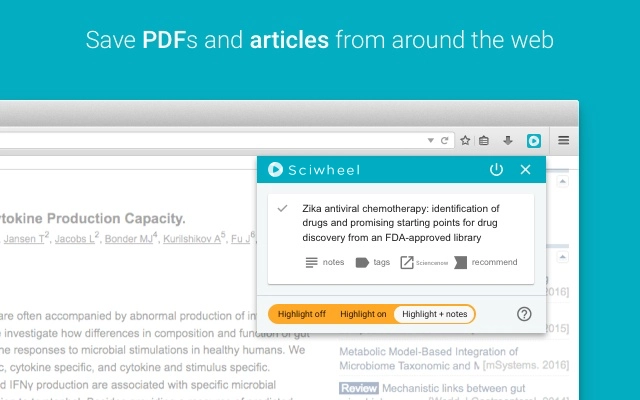
- Text highlighting and annotation – Highlight key passages, add notes, and annotate figures directly within the article interface.
- Full searchability – All saved content and annotations are indexed and searchable across the F1000Workspace platform.
- Broad database compatibility – Functions across major research platforms including PubMed, Google Scholar, Microsoft Academic, Web of Science, and EBSCO.
- Seamless integration with F1000Workspace – Annotations and saved items sync with the reference manager for organized research workflows.
These features support efficient literature management, allowing users to build a personalized research archive without leaving their browser. For example, a graduate student reviewing dozens of journal articles can quickly save relevant content, annotate key findings, and later retrieve them using keyword searches. Similarly, a researcher compiling data for a manuscript can preserve source material with contextual notes, ensuring traceability and accuracy.
User Interface, Workflow & Performance
The extension operates directly within the browser, with minimal UI disruption. Users interact with it through a small icon in the browser toolbar, which activates when on a compatible research webpage. The interface is clean and focused, prioritizing speed and simplicity over visual complexity.
Navigating between saved articles and annotations is handled through the F1000Workspace platform, which maintains a centralized view of all collected material. The workflow is designed to minimize friction: from selection to saving to annotation, the process is streamlined into a few clicks. This enhances productivity, especially during intensive research sessions.
The developer did not specify resource usage details. Performance observations are based on general software behavior patterns. The extension is reported to function reliably across supported platforms, with no known issues related to stability or browser crashes. However, actual CPU and RAM behavior may vary depending on the number of saved articles and the complexity of annotations.
Compatibility & System Requirements
The F1000 Workspace Chrome extension is compatible with both Windows and Mac operating systems. It operates as a browser extension, meaning it runs within the Google Chrome environment. The installation size is 1.8 MB, indicating a lightweight footprint.
Exact system requirements were not listed. The developer did not specify minimum hardware specifications or Chrome version requirements. Platform compatibility information is limited to the supported OS platforms. Users are advised to ensure their system meets standard browser requirements for Chrome to run extensions properly.
Pros and Cons
Pros
- Effortless one-click saving of research articles and webpages
- Automatic capture of citation data, links, and PDFs when available
- Powerful annotation tools with full searchability
- Extensive compatibility with leading academic databases
- Lightweight installation at just 1.8 MB
- Free access to core functionality
Cons
- Requires a subscription for full access to premium features
- Dependent on the F1000Workspace reference manager for full functionality
- Compatibility limited to Chrome browser
- Exact system requirements not publicly available
- Performance under heavy use not specified
FAQ Section
Is the F1000 Workspace Chrome extension free to use?
Yes, the extension is available at no cost. However, access to advanced features such as full annotation syncing and cloud storage requires a subscription to the F1000Workspace platform.
Which operating systems does the extension support?
The extension is compatible with Windows and Mac operating systems. It functions as a Chrome browser extension, so it requires the Google Chrome browser to be installed.
Does the extension work with all research websites?
The extension is designed to work with the majority of research journals and scientific databases, including PubMed, Google Scholar, Microsoft Academic, Web of Science, and EBSCO. However, compatibility may vary depending on the website’s structure and content delivery methods.
Is my data secure when using the extension?
While specific security measures were not detailed, the tool is designed for academic use and integrates with a reference manager that likely employs standard data protection practices. Users are encouraged to review the privacy policy on the official website.
Can I use the extension offline?
The extension requires an active internet connection to save and sync content with the F1000Workspace platform. Offline use is not supported for saving or retrieving annotated articles.
Final Thoughts
The F1000 Workspace Chrome extension delivers a focused, efficient solution for researchers and students who need to save and annotate academic content quickly. Its ability to integrate with major research databases and preserve citation details makes it a valuable tool for literature review and academic writing. The lightweight design and free access to core features enhance its appeal, especially for users managing large volumes of research material.
While premium functionality requires a subscription, the free tier provides sufficient tools for basic saving and annotation tasks. The extension’s seamless workflow and broad compatibility make it a strong choice for anyone working in scientific or academic environments. For those seeking a reliable, browser-based research assistant, this tool stands out as a practical and effective option.
Download F1000 Workspace Chrome Extension now







